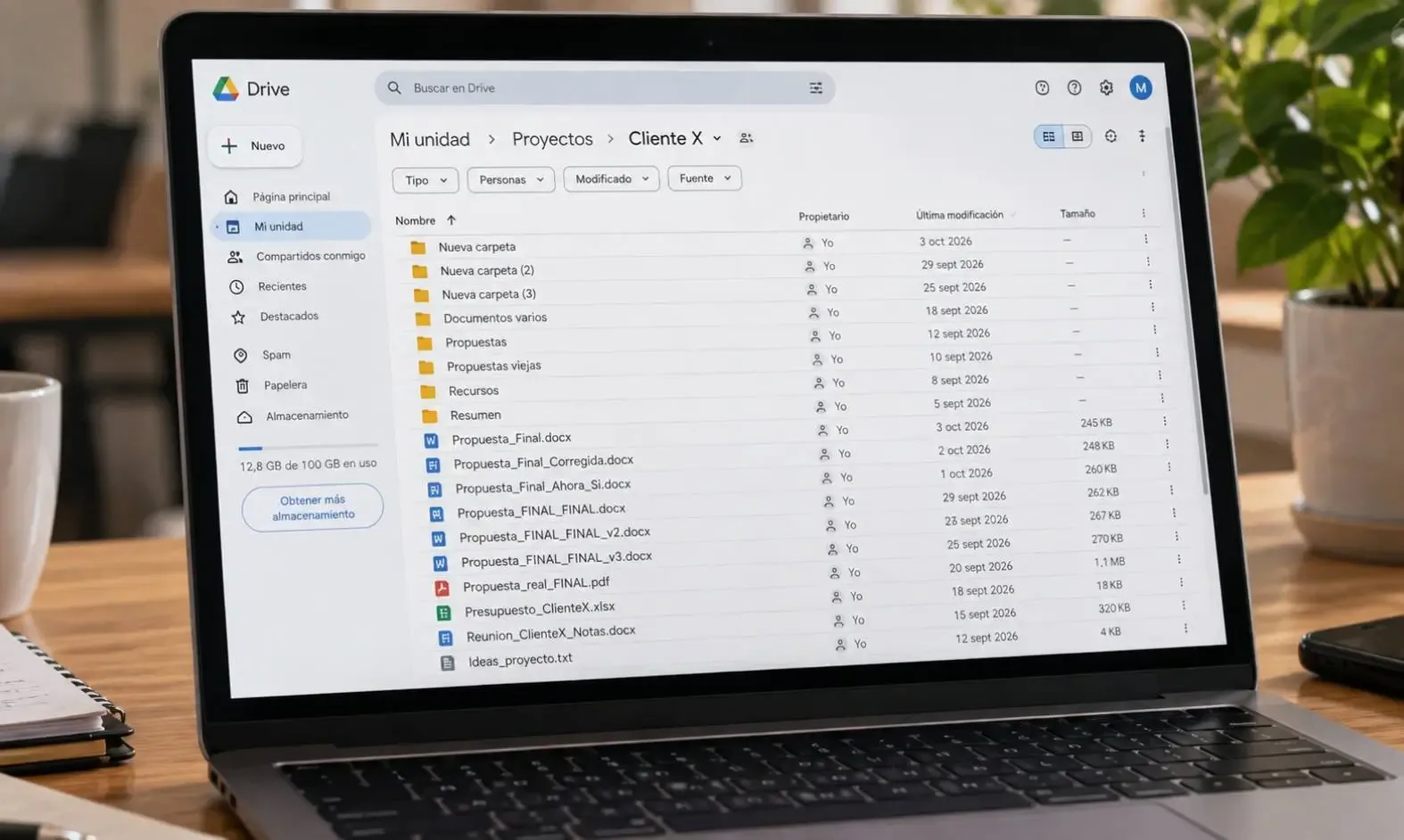
Google Drive, 47 folders and a file called “FINAL_FINAL_v3”: does your company work like this too?
Duplicate folders, scattered documents and files with the word “final” in their name five times. Google Drive can be an excellent tool, but when the whole operation depends on finding the right file, something needs to change.
By serginho 6 min read Updated October 9, 2026
In this article
If you work at a company that has been using Google Drive for a few years, you will probably recognize this sequence:
- Proposal_Final.docx
- Proposal_Final_Revised.docx
- Proposal_Final_This_Time_For_Real.docx
- Proposal_FINAL_FINAL_v3.docx
Everyone knows FINAL_FINAL_v3 isn’t the final version. The real one is probably on somebody’s desktop, inside a folder called “New folder (2)”. And the one that was sent to the client may well be a different one altogether, attached to an email nobody can find.
It’s a funny scene until you have to prepare a renewal, respond to a complaint or piece together what was agreed with a supplier. That is when the mess stops being an anecdote and starts costing time, mistakes and sometimes money.
How companies end up here
Nobody decides to make a mess of the company Drive. At first it was the most practical way to share files among a handful of people, and it worked because everyone knew where everything was. Then the company grew, new people joined, each department created its own folders and everyone started saving things their own way.
Other habits crept in along the way: downloading a file to edit it and uploading it again under a new name, saving documents in “My Drive” instead of a shared folder, sending versions over WhatsApp or email. None of these decisions is serious on its own. Added together over the years, they produce a Drive with hundreds of folders that nobody dares to delete, just in case.
What is missing in almost every case isn’t a better tool, but an agreement on how information is stored, who is responsible for each document and which version is the one that counts.
What working this way costs you
The first cost is time. Every time someone searches for a file, opens three versions to work out which is the latest or asks a colleague whether it’s the right one, a few minutes go by. It doesn’t sound like much, but it happens several times a day across most of the team, and that time never shows up in any report.
The second is mistakes. Sending a client a proposal with old prices, printing a contract without the latest clauses or working on a spreadsheet that someone had already corrected in another copy are direct consequences of not knowing which version is current.
There is a third, less visible problem: dependence on individuals. If finding a contract means asking the one person who knows where it’s saved, you don’t have a document management system. You have a treasure hunt. And when that person goes on vacation, or leaves the company, the map goes with them. Sometimes the files do too, if they were stored in their personal account.
Storing documents is not the same as managing processes
Google Drive is very good at what it was built for: storing files, sharing them and letting several people work on them. The trouble starts when you ask it to do more.
Think about a sales proposal. Besides the document itself, the company needs to know its status, who is working on it, when it was sent, whether the client replied and what the next step is. Drive has no way of recording that, so people handle it however they can: in the file name. That is where “Proposal_Sent”, “Proposal_Client_Approved” or “Proposal_Review_John” come from. The file name ends up working as an improvised tracking system, and that is exactly what makes it unmanageable.
When Drive is used to follow projects, track statuses or keep tabs on who has to do what, a parallel spreadsheet and a WhatsApp group for coordination usually appear as well. The information ends up split across three places, and none of them holds the full story.
How to organize information without making work harder
Set up a structure that doesn’t depend on individuals
Folders should be organized by client, project or department, not by who works on what. Shared drives in Google Workspace help a lot here, because the files belong to the company rather than to each employee’s account. Keep the structure to a few levels and explain it in a short document, so any new team member can understand it without having to ask.
Keep a single current version
Google Docs and Sheets keep a version history, and for uploaded files Drive lets you upload a new version over the existing one. Using those features instead of making copies cuts down confusion considerably. When you do need to keep earlier versions, such as the proposal that was actually sent, they can go into an archive folder with the date in the name. A simple convention, like starting every file name with the date in year-month-day format, brings more order than any number of “finals”.
Assign owners
Each main folder should have someone in charge of keeping it tidy and reviewing access permissions. It doesn’t need to be a full-time job, but it should be clear who decides what gets archived and what gets deleted.
Tidy up gradually
There is no need to reorganize the entire Drive over a weekend. It usually works better to define the new structure, apply it to everything created from now on and move older material across as it gets used. Whatever nobody has opened in years can stay in a historical archive folder.
When Drive is no longer enough
Buying software won’t fix the problem on its own. If the company hasn’t defined how it works, the mess simply moves into the new tool, with a nicer interface and a monthly subscription. That is why it makes sense to sort out processes first and only then assess whether the existing structure is enough.
In many cases it is. But there are signs that a company needs something more: when it has to track the status of projects, orders or requests, when it matters who made each change and when, when owners and deadlines are tracked in a separate spreadsheet, or when management needs reports that are currently put together by hand. In that situation, a system that brings together projects, owners, statuses, documents and history can organize the operation without forcing the company to give up Drive, which can remain the place where files are stored.
At DodoLab we help companies move from that mix of folders, spreadsheets and messages to tools that reflect how they actually work. If you feel your Drive has become the company’s management system without anyone deciding it should, tell us about your case and see how we build custom systems.
Frequently asked questions
What happens to files when someone leaves the company?
If they were in that person’s My Drive, the files can be lost when the account is deleted, unless someone transfers ownership first. That is why company information should be kept in shared drives, and why offboarding a user should include reviewing and transferring their files.
Do old versions need to be deleted?
Not always. They often need to be kept, especially if they were sent to clients or have legal value. What matters is keeping them separate from the current version, in an archive folder, so nobody works on them by mistake.
Was this article helpful?
Get an assessment